New functions and updates in the bluepos® system
bluepos® mobile
Extended NFC-SCAN
With the latest bluepos mobile versions, the integrated NFC readers in SmartPOS terminals such as the PAX A920 and A77 are now also supported independently of the contactless payment function. NFC scanning makes the wireless reading of data from these payment terminals even faster and easier – SmartPOS. For example, the corresponding customer can be called up directly in bluepos mobile via an NFC customer card.
bluepos® pay
Simple and reliable
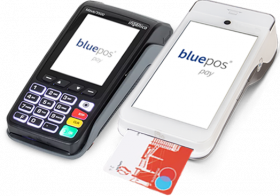
The bluepos® integrated bluepos pay ZVT solution has received numerous improvements for cashless payment at the local checkout. In particular, the configuration has been simplified and optimized in many areas.
In addition, improvements have been implemented for payments via mobile devices, which ensure reliable payment processing, especially with an unstable Wi-Fi connection.
Updates at a glance
Further innovations and changes
bluepos® 3.0.4
bluepos® pay ZVT
- The input field for the IP address is now validated. It is no longer possible to enter an additional port
number. - The existing payment terminal options “No cancellation allowed”, “Only for
last invoice cancellation” and “No cash cut on daily closing” are now also available
in the bluepos pay ZVT (local cash register) section. These are synchronized and always apply to all terminal connections. Note: The options are now also available in P28 and P886 and
are also synchronized there. - The warning “This value is already in use!” is now displayed if the same COM port or IP address is already configured for a payment terminal connection. Note: The Pepper configuration is only checked on the local cash register.
Pepper driver
- Support of terminal type 122 “Nexigroup, O.P.I.”, requires the Pepper driver in version 25.1.029.
Printer
- The drawer connection on the Posiflex PP7600 printer is now supported.
- The Bixolon SRP-330III printer is supported. It can be connected via V24, USB or Ethernet.
bluepos® mobile 3.5.171
- For the PAX A77 and A920 devices, the version of the installed SecPosEvo version is checked and displayed. If a version greater than 70.05.01 is detected at the first start, the mAPI interface is initially configured instead of the ZVT interface. The installed version is also displayed in the bluepos® mobile options menu.
- In the event of a loss of connection for bluepos® pay payments via PAX or SoftPOS devices, a recovery procedure has been implemented. You will now be notified of the internet connection failure. As soon as the connection is re-established, the payment process recovery procedure starts. The procedure can take up to 30 seconds and the result is reported back to bluepos.
- Log files in bluepos® mobile could exceed the limit of 512 MB. As a result, the log files cannot be transferred to bluepos®. Up to 5 log files with a size of up to 100 MB are now saved before the oldest log file
is deleted. - The NFC SCAN function is available on the Pax devices via the bluepos® mobile side menu. If this is triggered and an NFC chip is found, the ID is transmitted to bluepos® mobile. For example, the corresponding customer can be called up via a customer card.